

The timer guide on this site covers programming a basic battery hose timer, start time, run time, frequency, the three settings that actually matter. This one’s a different question: whether to skip that basic timer entirely and buy into a Wi-Fi controller instead. It’s a real upgrade for some setups and pure overkill for others, and the difference usually comes down to how many zones you’re running and how often you’re actually standing at the spigot.
Three tiers, from basic to smart
Tier one: mechanical or basic digital timer
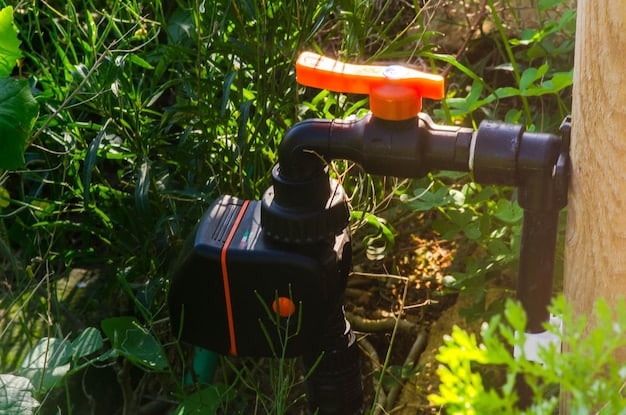
Screws onto the spigot, runs off two AA batteries, programs a start time, a duration, and a frequency. No app, no Wi-Fi, no moving parts to fail beyond the valve itself. This handles the vast majority of home gardens fine and it’s what I’d tell most people to start with.
Tier two: a Wi-Fi connected hose timer
Same physical job as tier one, but it talks to an app over your home Wi-Fi. You get remote start and stop from your phone, a run history, and usually a weather-skip feature that checks a forecast and cancels a cycle if rain’s already covered it. Most run one or two zones from a single unit.
Tier three: a full smart controller
A wired or battery hub that manages several valves at once, often with inputs for soil moisture sensors so a zone waters based on actual soil conditions instead of a fixed calendar. This is the tier that starts to resemble a real irrigation controller rather than a fancier hose timer, and it’s priced accordingly.
What smart actually buys you
The weather-skip feature earns its keep on its own. A basic timer runs on schedule regardless of whether it rained an inch overnight, and I’ve watered soaked soil more than once because I forgot to hit the manual rain-delay button. A connected timer checks that automatically. Remote start matters most if you’re not physically at the property every day, a vacation home, a community garden plot, a rental you manage from across town. Being able to start a cycle from your phone to check whether an emitter’s clogged, without walking out to the spigot, is a small thing that adds up over a season.
Soil moisture sensors, where the tier-three controllers support them, are the biggest functional jump. Instead of running on a fixed schedule adjusted by guesswork, the zone waters when the soil actually needs it. That’s the difference between a calendar and a thermostat, and it matters most in a climate with unpredictable rain, less in one where the weather’s boring and consistent all season.
Where it lets you down
Wi-Fi range is the first failure point nobody checks before buying. Spigots are usually outside, often around a corner or behind the house, and router signal that’s fine in the kitchen can be unreliable at the hose bib. Test it with a phone at the actual mounting spot before committing to a unit that needs a live connection to function.
Firmware updates are the second one. I’ve had a connected timer lose its schedule mid-season after a background update, and it sat idle for four days before I noticed the app showing “last watered” from before the update. A basic mechanical timer can’t do that; it just keeps running the program it was given. Most smart controllers do fail closed on a lost connection, meaning they stop watering rather than watering blind, which is the safer failure mode but still means no water until someone notices.
Some tier-two and tier-three units also tie core scheduling to an account and an app that could change pricing or shut down entirely. That’s a real consideration for a device meant to run for years, less so for one you’re replacing every couple of seasons anyway.
Comparing the tiers
| Tier | Rough cost | Needs | Best for | Main failure mode |
|---|---|---|---|---|
| Basic timer | $20-$40 | 2 AA batteries | One or two zones, simple schedules | Dead batteries, fails closed silently |
| Wi-Fi timer | $50-$100 | Home Wi-Fi in range, app account | Remote access, weather-skip, 1-2 zones | Lost connection, firmware hiccups |
| Smart controller + sensors | $150-$400+ | Wiring or hub, sensor probes | Multiple zones, moisture-based watering | More points of failure, higher setup effort |
Is it worth it for your setup?
For a single raised bed or a cluster of containers, no. A basic timer plus a monthly dig-test habit does the job for a fraction of the cost and nothing to troubleshoot when the Wi-Fi hiccups. Past three or four zones, or if it’s a property you’re not at daily, the case gets stronger fast: the weather-skip alone saves enough water and plant stress to justify the price difference within a season or two, and remote start turns “I forgot to check before the heat wave” into a thirty-second phone check.
Setting one up without wasting a weekend
Test the Wi-Fi signal at the actual spigot location before mounting anything permanently. Keep the same assembly order as any drip system: timer first, then backflow preventer, filter, and the pressure regulator, in that order, smart or not. And keep the manual override habit even after the app’s set up; the first heat wave after a firmware glitch is not the time to discover the phone app won’t connect.
Mistakes worth avoiding
- Buying a smart controller before checking Wi-Fi signal at the spigot. A weak connection defeats the entire point of the upgrade.
- Assuming weather-skip means you never check the garden. It cancels obvious rain days; it doesn’t replace a monthly walk-through.
- Running soil moisture sensors without calibrating them to your soil type first. A sensor reading built for loam gives false readings in heavy clay or fast-draining sand.
- Buying tier three for one zone. The extra cost buys capacity you’re not using.
For beds far from an outlet, a solar-powered drip setup can run the whole system off-grid.
FAQ
Is a smart drip irrigation system worth it for one raised bed?
Usually not. A basic battery timer covers one or two zones fine, and the smart features that justify the price jump, multi-zone control and moisture sensing, don’t have much to work with on a single bed.
Does a smart controller need Wi-Fi to work at all?
Most need it for remote access and weather-skip, but many still run their basic on-device schedule if the connection drops. Check the specific model; some fail closed and stop watering entirely without a connection, others just lose the smart features and keep running the last saved program.
What happens if the Wi-Fi drops mid-cycle?
Most units finish the cycle that’s already running since it’s stored locally, then lose the ability to start new remote cycles or receive weather data until the connection’s back. It’s worth confirming this behavior for a specific model before relying on it for a vacation stretch.
Can I add soil moisture sensors to an existing basic timer?
Not usually. Sensor integration is a tier-three feature built into the controller’s logic, not something that bolts onto a basic hose timer. Moving to sensor-based watering generally means replacing the timer, not upgrading it.
The smart tier is worth the money on the right property and a waste of it on the wrong one, and the honest test is whether you’d actually use the remote and sensor features or just end up walking out to check the garden anyway. For the parts that stay the same regardless of which timer runs them, the system price breakdown has the full cost picture.